Review Comments (0) Screenshots (7) Questions & Answers (0) Votes (0) Awards (2) Wiki  
2.37
www.fm-pdf.com
Freeware
236 people
Download FM PDF To JPG...

9.89 MBDownloaded 238 times

This software was checked for viruses and was found to contain no viruses.
Click here to see antivirus report.
 
Video tutorial for FM PDF To JPG Converter Free 2.0
Frame

Review

FM PDF to JPG Converter Free is a handy software tool whose main purpose can be deducted from its name easily - it helps you to convert your PDF files into either JPGs or other popular image formats with ease. The program offers a surprisingly extensive set of configurable options while supporting batch conversion, so that it can process several of your PDF files at once using your favorite conversion profiles.

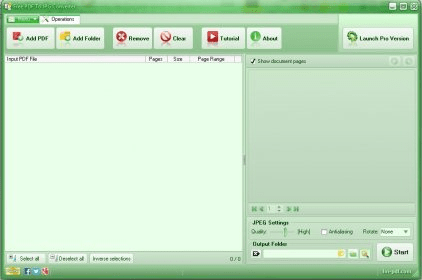
The program offers you some quick-access buttons on the top side of its interface that allow you to add your PDF files to be converted using three different methods - you can pick up your files by means of a standard Windows-based "Open" dialog; you can specify the URL where the PDF file can be found, either in the Internet or in an intranet location; and, finally, you can let the program search specific folders for PDF files that match a certain mask. Your PDF files will be analyzed and listed showing their path and their number of pages. You can also select which pages you wish to convert - all, the first or the last x number of pages, odd or even pages, or a specific range. Using the "Watermark" button, you can also launch an external tool called the "Watermark Profile Designer", which allows you to create personalized watermarks to be included in your converted files.

In the "Image Profile" section you can set various parameters related to the output files, including the output folder, the image format - among BMP, GIF, JPEG, PNG, TIFF, and others - the resolution (in DPI), the color depth, the JPG quality (its level of compression), or the maximum file size. Besides, you can decide here whether to resize the image files or to apply any special output layouts to them, among many other settings. Finally, you can switch to the "Log" tab, which will display all the messages generated by the conversion process.

This program is free. However, it allows you to work with a predefined output configuration only: JPEG format, a 72-DPI resolution, RGB color depth, and 70% quality. In case you change any of these parameters, a watermark will be included on all your resulting files (regardless of and together with any custom watermarks you created using the Watermark Profile Designer). There is also a Professional version of the program that you can buy for a starting price tag of $49.90, which is, of course, free of the above-mentioned limitation.
  • Supports batch conversion.
  • Offers an extensive set of configurable options.
  • Converts not only into JPG images, but also into other image formats.
  • Allows you to add PDF files for conversion directly from the Internet or an Intranet.
  • Automatically searches on specific folders for PDF files that match a given mask.
  • Includes an external tool for you to create your own personalized watermarks to add to converted files.
  • None.

Reviewer rating:

Reviewed: 4 months ago

Report a wrong version Report a wrong program title Suggest a correction

Screenshots

Main Window Main Window Preferences Window Preferences Window Automatic PDF File Search Automatic PDF File Search Adding a PDF File from the Internet Adding a PDF File from the...
All 7 screenshots

Latest comments


There are no comments, be the first one!
Add new comment

E-mail Address:

Password:

Register now »

Forgot password?

Sign in with:
Facebook Account
Download Software Informer Client
Copyright © 2012, Informer Technologies, Inc. About| Terms & Privacy| FAQ| Feedback & Support| For Developers
